Table of Contents MathBits.com Terms of Use TI-84+ WebSite MathBits.com

Equation Checks
for Multiple Choice Questions

The graphing calculator allows for several methods of checking or comparing multiple choice answers.  Let's look at the checking of algebraic problems by forming equations.

Process:

  • Choose your "favorite" non-integer number (a decimal value) and store the value in x
    (keep the number simple).   To store 7.2:   7.2 sto x    (sto command is above key)
  • Hit

  • Enter the algebraic expression from the problem on the calculator screen using x as your variable (or any letter from the keyboard that the problem may be using).
  • Set this expression "=" to each of the multiple choice answers.
    The "=" sign is the key.
  • Hit ENTER.

  • If a false appears, this is NOT the correct answer.
    If a true appears, this IS the correct answer.


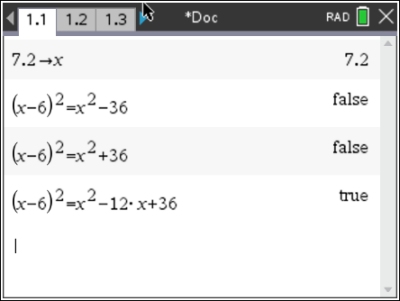
1. The expression (x - 6)2 is equivalent to
     (1) x2 - 36
     (2) x2 + 36
     (3) x2 - 12x + 36
     (4) x2 + 12x + 36


The "favorite" number used here was 7.2.  When you hit and "true" appears, you will have found the answer (you found the equivalent answer).


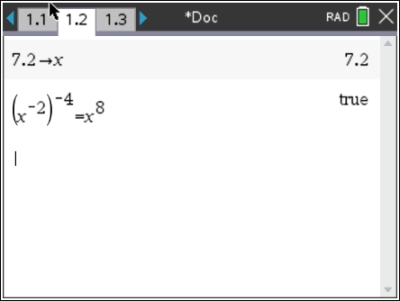
2.  Which of the following statements is true?
     (1)21
     (2) 22
     (3) 23
     (4) 24
Use parentheses where needed. Remember to use the "negative symbol" and not the "subtraction" symbol for the negative exponents.


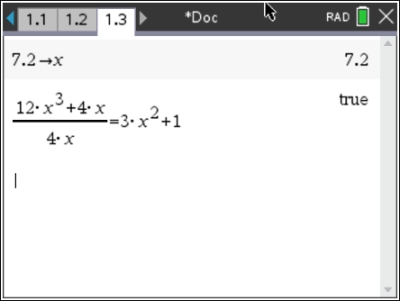
3.  When 12x3 + 4x is divided by 4x, the answer is
    
(1) 3x2 + 1
     (2) 3x + 1
     (3) 3x2 + x
     (4) 3x2
When the given information is set up as a fraction, it is easy to see which choice will be the correct answer.


divider
Table of Contents | MathBits.com | Terms of Use

Table of Contents MathBits.com Terms of Use TI-84+ web site